
Chrome extension
Every web page, with your words marked
Read anything in the language you learn. The extension marks the words you already know and the ones you do not, translates a word with a click and keeps it for your flashcards.
How to use the extension
Seven things to know, in the order you will meet them.
- Sign in through the site. Click the extension's icon and press Sign in through the site. If you are already signed in on repeat.cards, the extension connects at once; there is no second password.
- Highlight a page. Open an article in the language you learn and press Highlight words in the extension's window, or press Alt+Shift+H. The language is recognised among the languages of your decks.
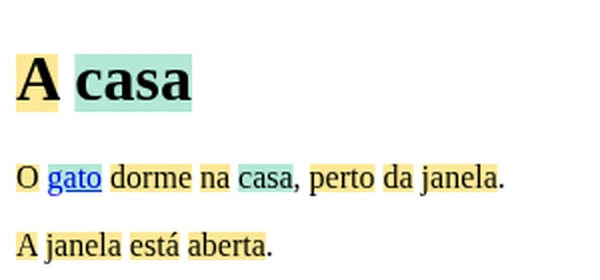
- Read the marks. Yellow words are new to you; green words you know or already have on a card or in your inbox. Numbers and names are left unmarked.
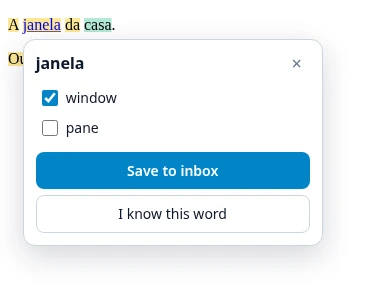
- Click a word to translate it. A panel opens next to the word with its translations. Tick the ones you want and press Save to inbox; Undo takes it back.
- Hold a word you already know. Keep the mouse button down on a yellow word for half a second: it fills with green and goes onto your known-words list, without a translation and without spending coins.
- Select text to translate a phrase or a sentence. A Translate button appears next to the selection. Up to five words are a phrase you can save to your inbox; a longer passage is translated whole, with a Copy button.
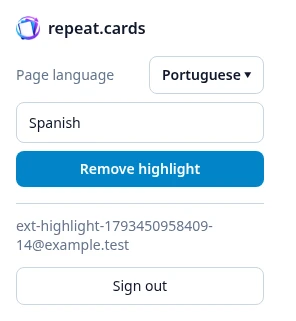
- Correct the language if needed. In the extension's window you can pick another language for the page, and the choice is kept for that site. If you learn one language through two others, Translate to picks which one the words are translated into.
Off with Esc, on with a shortcut
Press Esc or Alt+Shift+H again to remove the marks. The shortcut can be changed on Chrome's extension shortcuts page. Text that the page loads later, such as comments or the next posts of a feed, is marked as it appears.
What it costs
Highlighting a page and marking words as known are free. A translation spends coins from the same balance as the app, and the panel shows your balance and what each translation took off it. An account with its own provider keys pays its provider instead.
What the extension sends
Individual words, to identify the ones you know and translate the ones you click, plus any text you select for translation. The page’s address and title are never sent, and its full text is not sent automatically. The extension reaches a page only when you press Highlight words or the shortcut. The details are in the privacy policy.
Questions
Which browsers does it work in?
Why does it say there is no deck in the page's language?
Why can it not work on some pages?
Do I need an account?
Read the web in the language you learn
Create an account, add a deck, and the extension knows your words.
Create a free accountKeep reading
Read books
Upload an EPUB or FB2 book, see new words marked, and tap one to translate it and save it.
Learn from videos
Open a video link or file, tap a word in the subtitles to translate it, and save it for training.
Android app
The free Android app: same decks and schedule as the web, plus reminders and the capture bubble.
Pricing
What coins are, what packs cost, and what stays free.